Roles
- Former user (Deleted)
- Former user (Deleted)
- Pat Zelei
Roles are defined by the district to represent the basic functions, responsibilities, or tasks of users in the district. Each role is granted one or more "Permissions", each of which allows a specific functionality within the software. For example, there are separate permissions which allow create, update, delete, and/or view access to each main interface in the system. Each user is then assigned one or more roles, thus granting them the permissions related to those roles.
When creating roles you cannot use an underscore in the role id. Underscores are reserved for SSDT standard roles. You cannot edit or delete roles that contain underscores (the SSDT standard roles).
SSDT Roles
The following roles are standard SSDT created roles. For new, non-migrating instances, these roles will be available when the instance is created.
| USAS Role | Classic USAS Identifier | Definition |
|---|---|---|
| SYSMAN_USER | OECN_SYSMAN | Classic System Manager Role |
| USAS_MANAGER | OECN_USAS_GM | Classic USAS Group Manager Role |
| USAS_STANDARD | OECN_USAS | Classic USAS Standard Role |
| USAS_RO | OECN_USAS_RO | Classic USAS Read-Only Role |
| USAS_REQ | OECN_USAS_REQ | Classic USAS Requisition-Only Role |
| USAS_FILEARCHIVE | N/A | File Archive View Role |
| USAS_USER_PROFILE | N/A | This role grants the necessary permissions to allow a user to make limited updates to any user profile. |
| EMIS_SIF | N/A | EMIS SIF Role |
| AR_MANAGER | OECN_AR_GM | Classic ARF Group Manager Role |
| AR_STANDARD | OECN_AR | Classic ARF Standard Role |
| AR_RO | OECN_AR_RO | Classic ARF Read-Only Role |
While each user's classic identifier was imported into USAS when the migration from Classic software occurred, roles may be further defined by the entity. Below are a few examples of new roles that may also be created:
TREASURER
SUPERINTENDENT
SECRETARY
ASSISTANT-TREASURER
ACCOUNTS PAYABLE
ACCOUNTS RECEIVABLE
SECRETARY
TECH COORDINATOR
TEACHER
Permissions
Permissions can be assigned when creating a role and allow a user to perform certain functions within the software. Permissions are set up in a hierarchy. Granting access to the top level grants all the access below it. For example, the following permissions are available for vendors:
USAS_VENDOR
USAS_VENDOR_CREATE
USAS_VENDOR_DELETE
USAS_VENDOR_REPORT
USAS_VENDOR_UPDATE
USAS_VENDOR_VIEW
Granting a permission of USAS_VENDOR will give the ability to create, delete, update, run reports and view vendors. Granting a permission of USAS_VENDOR_VIEW only to a user will restrict a user to view vendors only.
Limited permissions will limit the functions of another permission that has been granted. Currently, the only limited permission available is LIMITED_USAS_USER_UPDATE. If this permission is granted it will limit that user from certain functions of the USAS_USER_UPDATE permissions if granted on the role or ANY of the other roles assigned to the user.
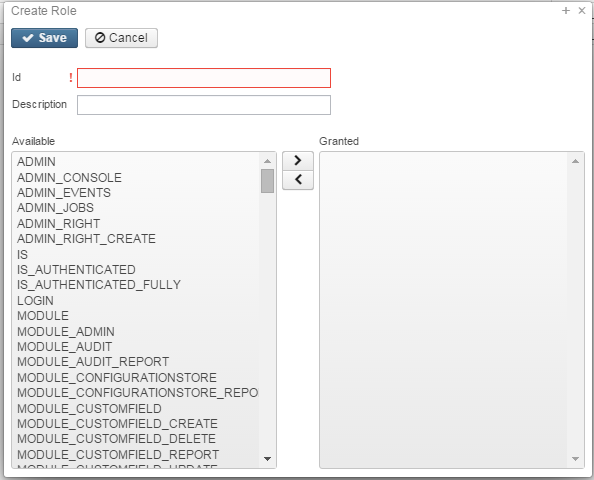
Create a Role
- From the System menu select 'Role'
- Click on

- Enter in an Id and description
- Grant the Role Permissions
Highlight the desired permission
To select more than one permission at a time hold the control key and click on each one
To select more than one permission in consecutive order highlight the first permission, hold the shift key and highlight the last permission
- click the arrow to the right to assign a permission and click the arrow to the left to un-assign a permission
- Click on
 to create the Role, click on
  to not create the Role and return to the Role grid
Search for a Role
The Role grid allows the user to search for existing account filters by clicking in the filter row in the grid columns and entering in the desired information. Click on any row of the search results to see a summary view of the record. The Advanced Search can be utilized by clicking on the  in the upper right side of the grid.
Edit a Role
Click on the  in the grid beside the Role to edit it. Only fields that are allowed to be edited will be displayed. Any user that is granted the Role that is being updated will automatically assume the updates done to that Role once the changes are saved.
Delete a Role
Click on  in the grid beside the desired Role . A confirmation box will appear asking to confirm that the Role should be deleted.
Roles may only be deleted if the role is not assigned to any user record
SSDT Roles Permissions
- SYSMAN_USER role is equivalent to the ITC System Manager identifier in Classic. The SYSMAN_USER role contains complete access to the following permissions:
- ADMIN
- LOGIN
- MODULE
- MODULE_CONFIG
- USAS
- USAS_MANAGER role is equivalent to the OECN_USAS_GM (USAS Group Manager) identifier in Classic. The USAS_MANAGER role contains the following permissions:
- ADMIN_REPORTS
- LIMITED_USAS_USER_UPDATE
- LOGIN
- MODULE_AUDIT (complete access)
- MODULE_CONFIG_ORGANIZATION
- MODULE_CUSTOMFIELD (complete access)
- MODULE_FILE (complete access)
- MODULE_IMPORT
- USAS_ACCOUNT (complete access)
- USAS_ACCOUNTCHANGEREQUEST
- USAS_ACCOUNTHISTORY
- USAS_ACCOUNTMAPPING
- USAS_ACCOUNTSUMMARY
- USAS_ACCOUNTTRANSACTION
- USAS_ACCOUNTTRANSITION
- USAS_ACTIVITYLEDGER
- USAS_ANTIPCATEDREVENUE
- USAS_APPROPRIATION
- USAS_BANKACCOUNT
- USAS_BUDGET
- USAS_BUDGETING
- USAS_CASHRECONCILIATION
- USAS_CODES
- USAS_DELIVERYADDRESS
- USAS_DISBURSEMENT
- USAS_DISTRIBUTION
- USAS_EIS
- USAS_EMIS
- USAS_FILTERS
- USAS_FISCALPERIOD
- USAS_FORECASTING
- USAS_GAAP
- USAS_GENERALLEDGER
- USAS_INTERFUNDCASH
- USAS_INVOICE
- USAS_OPU
- USAS_ORGANIZATION
- USAS_PAYABLE
- USAS_PENDINGTRANSACTION
- USAS_POSTINGPERIOD
- USAS_PRIVACY
- USAS_PROJECT
- USAS_PROPOSEDAMOUNT
- USAS_PURCHASEORDER
- USAS_RECEIPT
- USAS_REFUND
- USAS_REQUISITION
- USAS_RIGHT_REPORT
- USAS_RIGHT_VIEW
- USAS_TRANSACTION_ANTICIPATED_REVENUE
- USAS_TRANSACTION_BUDGET
- USAS_USER_REPORT
- USAS_USER_VIEW
- USAS_USER_REPORT
- USAS_USER_UPDATE
- USAS_USER_VIEW
- USAS_VENDOR
The USAS_MANAGER role contains the LIMITED_USAS_USER_UPDATE permission that will limit access granted by the USAS_USER_UPDATE permission. This role should NOT be assigned in combination with the Admin or SYSMAN_USER roles.
- USAS_STANDARD role is equivalent to the OECN_USAS (USAS Standard) identifier in Classic. The USAS_STANDARD role contains the following permissions:
- LOGIN
- MODULE_FILE
- MODULE_FILE_CREATE
- MODULE_FILE_FISCALYEARREPORT
- MODULE_FILE_FISCALYEARREPORT_REPORT
- MODULE_FILE_FISCALYEARREPORT_VIEW
- MODULE_FILE_MONTHLYREPORT
- MODULE_FILE_MONTHLYREPORT_REPORT
- MODULE_FILE_MONTHLYREPORT_VIEW
- USAS_ACCOUNT (complete access)
- USAS_ACCOUNTCHANGEREQUEST
- USAS_ACCOUNTHISTORY
- USAS_ACCOUNTMAPPING
- USAS_ACCOUNTSUMMARY
- USAS_ACCOUNTTRANSACTION
- USAS_ACCOUNTTRANSITION
- USAS_ACTIVITYLEDGER
- USAS_ANTICIPATEDREVENUE
- USAS_APPROPRIATION
- USAS_BANKACCOUNT
- USAS_BUDGET
- USAS_BUDGETING
- USAS_CASHRECONCILIATION
- USAS_CODES
- USAS_DELIVERYADDRESS
- USAS_DISBURSEMENT
- USAS_DISTRIBUTION
- USAS_EIS
- USAS_EMIS
- USAS_FISCALPERIOD
- USAS_FORECASTING
- USAS_GAAP
- USAS_GENERALLEDGER
- USAS_INTERFUNDCASH
- USAS_INVOICE
- USAS_OPU_REPORT
- USAS_OPU_VIEW
- USAS_PAYABLE
- USAS_PENDINGTRANSACTION
- USAS_PRIVACY_TAXID
- USAS_PRIVACY_VENDOR_ACH
- USAS_PROJECT
- USAS_PROPOSEDAMOUNT
- USAS_PURCHASEORDER
- USAS_RECEIPT
- USAS_REFUND
- USAS_REQUISITION
- USAS_TRANSACTION_ANTICIPATED_REVENUE
- USAS_TRANSACTION_BUDGET
- USAS_VENDOR
- USAS_RO role is equivalent to the OECN_USAS_RO (USAS Read-Only) identifier in Classic. The USAS_RO role contains the following permissions:
- ADMIN_AUDITEVENTS_REPORT
- LOGIN
- MODULE_FILE_FISCALYEARREPORT_REPORT
- MODULE_FILE_FISCALYEARREPORT_VIEW
- MODULE_FILE_MONTHLYREPORT_REPORT
- MODULE_FILE_MONTHLYREPORT_VIEW
- USAS_ACCOUNTCHANGEREQUEST_REPORT
- USAS_ACCOUNTCHANGEREQUEST_VIEW
- USAS_ACCOUNTHISTORY_BUDGET_REPORT
- USAS_ACCOUNTHISTORY_BUDGET_VIEW
- USAS_ACCOUNTHISTORY_CASH_REPORT
- USAS_ACCOUNTHISTORY_CASH_VIEW
- USAS_ACCOUNTHISTORY_EXPENDITURE_REPORT
- USAS_ACCOUNTHISTORY_EXPENDITURE_VIEW
- USAS_ACCOUNTHISTORY_REPORT
- USAS_ACCOUNTHISTORY_REVENUE_REPORT
- USAS_ACCOUNTHISTORY_REVENUE_VIEW
- USAS_ACCOUNTMAPPING_REPORT
- USAS_ACCOUNTMAPPING_VIEW
- USAS_ACCOUNTSUMMARY_REPORT
- USAS_ACCOUNTSUMMARY_VIEW
- USAS_ACCOUNTTRANSACTION_REPORT
- USAS_ACCOUNTTRANSITION_REPORT
- USAS_ACCOUNT_CASH_REPORT
- USAS_ACCOUNT_CASH_VIEW
- USAS_ACCOUNT_EXPENDITURE_REPORT
- USAS_ACCOUNT_EXPENDITURE_VIEW
- USAS_ACCOUNT_FUND_REPORT
- USAS_ACCOUNT_FUND_VIEW
- USAS_ACCOUNT_REPORT
- USAS_ACCOUNT_REVENUE_REPORT
- USAS_ACCOUNT_REVENUE_VIEW
- USAS_ACCOUNT_VIEW
- USAS_ACTIVITYLEDGER_REPORT
- USAS_ACTIVITYLEDGER_VIEW
- USAS_ANTICIPATEDREVENUE_REPORT
- USAS_ANTICIPATEDREVENUE_VIEW
- USAS_APPROPRIATION_REPORT
- USAS_APPROPRIATION_VIEW
- USAS_BANKACCOUNT_REPORT
- USAS_BANKACCOUNT_VIEW
- USAS_BUDGETING_REPORT
- USAS_BUDGETING_VIEW
- USAS_BUDGET_REPORT
- USAS_BUDGET_VIEW
- USAS_CASHRECONCILIATION_REPORT
- USAS_CASHRECONCILIATION_VIEW
- USAS_CODES_REPORT
- USAS_CODES_VIEW
- USAS_DISBURSEMENT_REPORT
- USAS_DISBURSEMENT_VIEW
- USAS_DISTRIBUTION_REPORT
- USAS_DISTRIBUTION_VIEW
- USAS_EIS_PENDING_REPORT
- USAS_EMIS_BUILDING_REPORT
- USAS_EMIS_CIVILPROCEEDING_REPORT
- USAS_EMIS_FEDERALASSISTANCE_REPORT
- USAS_FISCALPERIOD_REPORT
- USAS_FISCALPERIOD_VIEW
- USAS_FORECASTING_VIEW
- USAS_GAAP_EXPORT_VIEW
- USAS_GENERALLEDGER_REPORT
- USAS-GENERALLEDGER_VIEW
- USAS_INTERFUNDCASH_REPORT
- USAS_INTERFUNDCASH_VIEW
- USAS_INVOICE_REPORT
- USAS_INVOICE_VIEW
- USAS_OPU_REPORT
- USAS_OPU_VIEW
- USAS_PAYABLE_REPORT
- USAS_PAYABLE_VIEW
- USAS_PENDINGTRANSACTION_REPORT
- USAS_PENDINGTRANSACTION_VIEW
- USAS_PROJECT_REPORT
- USAS_PROJECT_VIEW
- USAS_PROPOSEDAMOUNT_REPORT
- USAS_PROPOSEDAMOUNT_VIEW
- USAS_PURCHASEORDER_REPORT
- USAS_PURCHASEORDER_VIEW
- USAS_RECEIPT_REPORT
- USAS_RECEIPT_VIEW
- USAS_REFUND_REPORT
- USAS_REFUND_VIEW
- USAS_REQUISITION
- USAS_TRANSACTION_ANTICIPATED_REVENUE_REPORT
- USAS_TRANSACTION_BUDGET_REPORT
- USAS_TRANSACTION_BUDGET_VIEW
- USAS_TRANSACTION_CASH_REPORT
- USAS_TRANSACTION_REPORT
- USAS_VENDOR_REPORT
- USAS_VENDOR_VIEW
File Archive View
This role does not contain access to the File Archive Reports. Some reports in the File Archive may contain sensitive information like the Vendor Tax ID. To grant users access to all reports in the file archive, the USAS_FILEARCHIVE role can be granted.
- USAS_REQ role is equivalent to the OECN_USAS_REQ (USAS REQ-Only) identifier in Classic. The USAS_REQ role contains the following permissions:
- LOGIN
- USAS_ACCOUNTHISTORY_BUDGET_VIEW
- USAS_ACCOUNTHISTORY_EXPENDITURE_VIEW
- USAS_ACCOUNT_EXPENDITURE_VIEW
- USAS_BUDGET_VIEW
- USAS_REQUISITION
- USAS_REQUISITION_CREATE
- USAS_REQUISITION_DELETE
- USAS_REQUISITION_REPORT
- USAS_REQUISITION_UPDATE
- USAS_REQUISITION_VIEW
- USAS_TRANSACTION_BUDGET_VIEW
- USAS_VENDOR_VIEW
- USAS_FILEARCHIVE role may be granted to users who need to view the File Archive Reports. Reports may contain sensitive information related to Vendor Tax ID information.
- LOGIN
- MODULE_FILE_AUDITREPORT
- MODULE_FILE_AUDITREPORT_REPORT
- MODULE_FILE_AUDITREPORT_VIEW
- MODULE_FILE_CALENDARYEARREPORT
- MODULE_FILE_CALENDARYEARREPORT_REPORT
- MODULE_FILE_FISCALYEARREPORT
- MODULE_FILE_FISCALYEARREPORT_REPORT
- MODULE_FILE_FISCALYEARREPORT_VIEW
- MODULE_FILE_MONTHLYREPORT
- MODULE_FILE_MONTHLYREPORT_REPORT
- MODULE_FILE_MONTHLYREPORT_VIEW
- MODULE_FILE_OTHER
- MODULE_FILE_OTHER_REPORT
- MODULE_FILE_OTHER_VIEW
- USAS_FILEARCHIVE_MANAGER role may be granted to users who need to view and manage the File Archive Reports. This role includes the ability to delete folders and individual reports from the File Archive. Reports may contain sensitive information related to Vendor Tax ID information.
- LOGIN
- MODULE_FILE
- MODULE_FILE_AUDITREPORT
- MODULE_FILE_AUDITREPORT_REPORT
- MODULE_FILE_AUDITREPORT_VIEW
- MODULE_FILE_CALENDARYEARREPORT
- MODULE_FILE_CALENDARYEARREPORT_REPORT
- MODULE_FILE_FISCALYEARREPORT
- MODULE_FILE_FISCALYEARREPORT_REPORT
- MODULE_FILE_FISCALYEARREPORT_VIEW
- MODULE_FILE_MONTHLYREPORT
- MODULE_FILE_MONTHLYREPORT_REPORT
- MODULE_FILE_MONTHLYREPORT_VIEW
- MODULE_FILE_OTHER
- MODULE_FILE_OTHER_REPORT
- MODULE_FILE_OTHER_VIEW
- USAS_USER_PROFILE role may be granted to users that should have limited access to update User information. This role will limit the USAS_USER_UPDATE access so that it does not include certain User functions like assigning roles or enabling/disabling users. Fields available to edit on the Users record with this role include name, title, email address, filters, selectable group chains, requisition prefixes, restrict requisitions, balance checking flags: allow negative appropriation, allow negative budget and warn on negative amounts.
- LIMITED_USAS_USER_UPDATE
- USAS_USER_UPDATE
- USAS_USER_VIEW
This Role limits the ability to update User Roles and some other high level functions. This should NOT be granted to users with SYSMAN_USER or ADMIN roles. Doing so will prevent those users from being able to update roles, including their own.
- EMIS_SIF role may be granted to users who need to run the EMIS option under the EXTRACT menu. The EMIS_SIF role contains the following permissions
- USAS_ACCOUNT_CASH_VIEW
- USAS_ACCOUNT_EXPENDITURE_VIEW
- USAS_ACCOUNT_REVENUE_VIEW
- USAS_APPROPRIATION_VIEW
- USAS_OPU_VIEW
- AR_MANAGER role is equivalent to the OECN_AR_GM identifier in Classic. The AR_MANAGER role contains the following permissions:
- LOGIN
- MODULE_AUDIT
- MODULE_AUDIT_CREATE
- MODULE_AUDIT_DELETE
- MODULE_AUDIT_REPORT
- MODULE_AUDIT_VIEW
- MODULE_CUSTOMFIELD
- MODULE_CUSTOMFIELD_CREATE
- MODULE_CUSTOMFIELD_DELETE
- MODULE_CUSTOMFIELD_REPORT
- MODULE_CUSTOMFIELD_UPDATE
- MODULE_CUSTOMFIELD_VIEW
- MODULE_FILE
- MODULE_FILE_CREATE
- MODULE_FILE_FISCALYEARREPORT
- MODULE_FILE_FISCALYEARREPORT_REPORT
- MODULE_FILE_FISCALYEARREPORT_VIEW
- MODULE_FILE_MONTHLYREPORT
- MODULE_FILE_MONTHLYREPORT_REPORT
- MODULE_FILE_MONTHLYREPORT_VIEW
- MODULE_IMPORT
- USAS_ACCOUNTSRECEIVABLE
- AR_STANDARD role is equivalent to the OECN_AR identifier in Classic. The AR_STANDARD role contains the following permission:
- LOGIN
- USAS_ACCOUNTSRECEIVABLE
- AR_RO role is equivalent to the OECN_AR_RO identifier in Classic. The AR_RO role contains the following permissions:
- LOGIN
- USAS_ACCOUNTSRECEIVABLE_ARLEDGER_VIEW
- USAS_ACCOUNTSRECEIVABLE_BILLING_REPORT
- USAS_ACCOUNTSRECEIVABLE_BILLING_VIEW
- USAS_ACCOUNTSRECEIVABLE_CREDIT_REPORT
- USAS_ACCOUNTSRECEIVABLE_CREDIT_VIEW
- USAS_ACCOUNTSRECEIVABLE_CUSTOMER_VIEW
- USAS_ACCOUNTSRECEIVABLE_LEDGERCODE_REPORT
- USAS_ACCOUNTSRECEIVABLE_LEDGERCODE_VIEW
- USAS_ACCOUNTSRECEIVABLE_LEDGER_REPORT
- USAS_ACCOUNTSRECEIVABLE_PAYMENTLOCATION_VIEW
- USAS_ACCOUNTSRECEIVABLE_PAYMENT_REPORT
- USAS_ACCOUNTSRECEIVABLE_PAYMENT_VIEW
- USAS_ACCOUNTSRECEIVABLE_REPORT
- USAS_ACCOUNTSRECEIVABLE_VIEW
Available USAS Permissions:
ADMIN
| Permission | Description |
|---|---|
| ADMIN | Full access to all permissions in USAS |
| ADMIN_AUDITEVENTS | Access to Auditable Events Report |
| ADMIN_AUDITEVENTS_REPORT | Access to Auditable Events Report |
| ADMIN_CONSOLE | |
| ADMIN_EVENTS | Allows user to see the Monitor view |
| ADMIN_IMPERSONATE | |
| ADMIN_JOBS | Abitlity to submit jobs that are not user jobs |
| ADMIN_LOGGING | |
| ADMIN_LOGGING_VIEW | Ability to view logging events |
| ADMIN_MASSCHANGE | Ability to save/delete/execute mass changes |
| ADMIN_MASSCHANGE_CREATE | |
| ADMIN_MASSCHANGE_DELETE | |
| ADMIN_MASSCHANGE_EXECUTE | |
| ADMIN_REPORTS | Full access to Reports and options on the Report Manager grid. Access to enable/disable Report Bundles. |
| ADMIN_RIGHT | |
| ADMIN_RIGHT_CREATE |
LOGIN
| Permission | Description |
|---|---|
| LOGIN | Access to log into the system |
MODULE
| Permission | Description |
|---|---|
| MODULE | Full Access to Configuration, Custom Field Definitions, DBA and Rules under System; Access to Audit Trail Report |
| MODULE_ADMIN | |
| MODULE_ADMIN_VIEW | |
| MODULE_AUDIT | Access to Audit Trail Report |
| MODULE_AUDIT_CREATE | |
| MODULE_AUDIT_DELETE | |
| MODULE_AUDIT_REPORT | Access to Audit Trail Report |
| MODULE_AUDIT_UPDATE | |
| MODULE_AUDIT_VIEW | |
| MODULE_CONFIG | Access to Configuration under System |
| MODULE_CONFIG_ORGANIZATION | |
| MODULE_CUSTOMFIELD | Full Access to Custom Field Definition under System |
| MODULE_CUSTOMFIELD_CREATE | Create access to Custom Field Definition under System |
| MODULE_CUSTOMFIELD_DELETE | Delete access to Custom Field Definition under System |
| MODULE_CUSTOMFIELD_REPORT | Create Custom Field Definition Report |
| MODULE_CUSTOMFIELD_UPDATE | Update Custom Field Definition under System |
| MODULE_CUSTOMFIELD_VIEW | View Custom Field Definition under System |
| MODULE_DBA | Full access to DBA under System |
| MODULE_DBA_BACKUP | Backup access to DBA under System |
| MODULE_DBA_QUERY | Query access to DBA under System |
| MODULE_FILE | Full access to the File Archive under Utilities, including the ability to delete folders and individual reports. |
| MODULE_FILE_CREATE | |
| MODULE_FILE_FISCALYEARREPORT | |
| MODULE_FILE_FISCALYEARREPORT_REPORT | |
| MODULE_FILE_FISCALYEARREPORT_VIEW | |
| MODULE_FILE_MONTHLYREPORT | |
| MODULE_FILE_MONTHLYREPORT_REPORT | |
| MODULE_FILE_MONTHLYREPORT_VIEW | |
| MODULE_IMPORT | |
| MODULE_PATCH | |
| MODULE_PATCH_ADMIN | |
| MODULE_PATCH_CREATE | |
| MODULE_PATCH_DELETE | |
| MODULE_PATCH_REPORT | |
| MODULE_PATCH_UPDATE | |
| MODULE_PATCH_VIEW | |
| MODULE_RULES | Full access to Rules under System |
| MODULE_RULES_CREATE | Create access to Rules under System |
| MODULE_RULES_DELETE | Delete access to Rules under System |
| MODULE_RULES_REPORT | Not available at this time |
| MODULE_RULES_UPDATE | Update access to Rules under System |
| MODULE_RULES_VIEW | View access to Rules under System |
| MODULE_TEMPLATE | |
| MODULE_TEMPLATE_REPORT |
USAS
| Permission | Description |
|---|---|
| USAS | Access to all permissions under the USAS permission |
| USAS_ACCOUNT | Access to all permissions under the USAS_ACCOUNT permission. |
| USAS_ACCOUNTCHANGEREQUEST | Full access to Account Change option under Utilities and Account Change Request Report |
| USAS_ACCOUNTCHANGEREQUESTR | |
| USAS_ACCOUNTCHANGEREQEUSTR_UPDATE | Update access to Account Change option under Utilities |
| USAS_ACCOUNTCHANGEREQUEST_CREATE | Create access to Account Change option under Utilities |
| USAS_ACCOUNTCHANGEREQUEST_DELETE | Delete access to Account Change option under Utilities |
| USAS_ACCOUNTCHANGEREQUEST_REPORT | Access to Account Change Request Report |
| USAS_ACCOUNTCHANGEREQUEST_VIEW | View access to Account Change option under Utilities |
| USAS_ACCOUNTHISTORY | Access to Cash Account History, Cash Account History Detail and Monthly Balance Reports |
| USAS_ACCOUNTHISTORY_BUDGET | |
| USAS_ACCOUNTHISTORY_BUDGET_CREATE | |
| USAS_ACCOUNTHISTORY_BUDGET_DELETE | |
| USAS_ACCOUNTHISTORY_BUDGET_REPORT | |
| USAS_ACCOUNTHISTORY_BUDGET_UPDATE | |
| USAS_ACCOUNTHISTORY_BUDGET_VIEW | |
| USAS_ACCOUNTHISTORY_CASH | Access to Cash Account History, Cash Account History Detail, Audit Trail and Monthly Balance Reports |
| USAS_ACCOUNTHISTORY_CASH_CREATE | |
| USAS_ACCOUNTHISTORY_CASH_DELETE | |
| USAS_ACCOUNTHISTORY_CASH_REPORT | Access to Cash Account History, Cash Account History Detail, Audit Trail and Monthly Balance Reports |
| USAS_ACCOUNTHISTORY_CASH_UPDATE | |
| USAS_ACCOUNTHISTORY_CASH_VIEW | |
| USAS_ACCOUNTHISTORY_EXPENDITURE | |
| USAS_ACCOUNTHISTORY_EXPENDITURE_CREATE | |
| USAS_ACCOUNTHISTORY_EXPENDITURE_DELETE | |
| USAS_ACCOUNTHISTORY_EXPENDITURE_REPORT | |
| USAS_ACCOUNTHISTORY_EXPENDITURE_UPDATE | |
| USAS_ACCOUNTHISTORY_EXPENDITURE_VIEW | |
| USAS_ACCOUNTHISTORY_REPORT | Access to Cash Account History, Cash Account History Detail, Audit Trail and Monthly Balance Reports |
| USAS_ACCOUNTHISTORY_REVENUE | |
| USAS_ACCOUNTHISTORY_REVENUE_CREATE | |
| USAS_ACCOUNTHISTORY_REVENUE_DELETE | |
| USAS_ACCOUNTHISTORY_REVENUE_REPORT | |
| USAS_ACCOUNTHISTORY_REVENUE_UPDATE | |
| USAS_ACCOUNTHISTORY_REVENUE_VIEW | |
| USAS_ACCOUNTMAPPING | |
| USAS_ACCOUNTMAPPING_CREATE | |
| USAS_ACCOUNTMAPPING_DELETE | |
| USAS_ACCOUNTMAPPING_REPORT | |
| USAS_ACCOUNTMAPPING_UPDATE | |
| USAS_ACCOUNTMAPPING_VIEW | |
| USAS_ACCOUNTSUMMARY | |
| USAS_ACCOUNTSUMMARY_CREATE | |
| USAS_ACCOUNTSUMMARY_REPORT | |
| USAS_ACCOUNTSUMMARY_UPDATE | |
| USAS_ACCOUNTSUMMARY_VIEW | |
| USAS_ACCOUNTTRANSACTION | |
| USAS_ACCOUNTTRANACTION_REPORT | |
| USAS_ACCOUNTTRANSITION | |
| USAS_ACCOUNTTRANSITION_REPORT | |
USAS_ACCOUNT_CASH | Full Access to Cash accounts under Core; Cash Summary and Appropriation and Receivables by Cash Reports |
| USAS_ACCOUNT_CASH_CREATE | Create Access to Cash Accounts under Core |
| USAS_ACCOUNT_CASH_DELETE | Delete Access to Cash Accounts under Core |
| USAS_ACCOUNT_CASH_REPORT | Access to Cash Summary and Appropriation and Receivables by Cash Reports |
| USAS_ACCOUNT_CASH_UPDATE | Update Access to Cash Accounts under Core |
| USAS_ACCOUNT_CASH_VIEW | View Access to Cash Accounts under Core |
| USAS_ACCOUNT_EXPENDITURE | Full Access to Expenditure accounts under Core; Budget Summary, Budget Summary MOE and Financial Budget Reports |
| USAS_ACCOUNT_EXPENDITURE_CREATE | Create Access to Expenditure Accounts under Core |
| USAS_ACCOUNT_EXPENDITURE_DELETE | Delete Access to Expenditure Accounts under Core |
| USAS_ACCOUNT_EXPENDITURE_REPORT | Access to Budget Summary, Budget Summary MOE and Financial Budget Reports |
| USAS_ACCOUNT_EXPENDITURE_UPDATE | Update Access to Expenditure Accounts under Core |
| USAS_ACCOUNT_EXPENDITURE_VIEW | View Access to Expenditure Accounts under Core |
| USAS_ACCOUNT_FUND | Full Access to Fund under Core; Summary of Cash Balances by Fund, Summary of Expenditures by Fund and Summary of Revenue by Fund Reports |
| USAS_ACCOUNT_FUND_CREATE | Create Access to Fund under Core |
| USAS_ACCOUNT_FUND_DELETE | Delete Access to Fund under Core |
| USAS_ACCOUNT_FUND_REPORT | Access to Summary of Cash Balances by Fund, Summary of Expenditures by Fund and Summary of Revenue by Fund Reports |
| USAS_ACCOUNT_FUND_UPDATE | Update Access to Fund under Core |
| USAS_ACCOUNT_FUND_VIEW | View Access to Fund under Core |
| USAS_ACCOUNT_REPORT | Access to Account Validation, Financial Report by Forecast Line Number and USAS Auditor Extract - Account Reports |
| USAS_ACCOUNT_REVENUE | Full Access to Revenue under Core; Revenue Expense Worksheet and Revenue Summary Reports |
| USAS_ACCOUNT_REVENUE_CREATE | Create Access to Revenue under Core |
| USAS_ACCOUNT_REVENUE__DELETE | Dekete Access to Revenue under Core |
| USAS_ACCOUNT_REVENUE_REPORT | Access to Revenue Expense Worksheet and Revenue Summary Reports |
| USAS_ACCOUNT_REVENUE_UPDATE | Update Access to Revenue under Core |
| USAS_ACCOUNT_REVENUE_VIEW | View Access to Revenue under Core |
| USAS_ACTIVITYLEDGER | Access to Activity Ledger Query and Budget Account Activity, Financial Detail, Listing of Transaction by Account, Reduction of Expenditure Ledger, Refund Ledger, Revenue Account Activity, Transaction Ledger - Vendor and USAS Auditor Extraction - Transaction Reports. |
| USAS_ACTIVITYLEDGER_DELETE | Not available at this time. |
| USAS_ACTIVITYLEDGER_REPORT | Access to Budget Account Activity, Financial Detail, Listing of Transaction by Account, Reduction of Expenditure Ledger, Refund Ledger, Revenue Account Activity, Transaction Ledger - Vendor and USAS Auditor Extraction - Transaction Reports. |
| USAS_ACTIVITYLEDGER_UPDATE | Not available at this time. |
| USAS_ACTIVITYLEDGER_VIEW | Access to Activity Ledger Query |
| USAS_ADMIN | Access to positive pay under Extract menu and Automatic Reconciliation under Utilities menu |
| USAS_ADMIN_CONFIG | |
| USAS_ADMIN_MOTD | Access to positive pay under Extract menu and Automatic Reconciliation under Utilities menu |
| USAS_ANTICIPATEDREVENUE | Access to Chart of Accounts - Revenue Report |
| USAS_ANTICIPATEDREVENUE_CREATE | |
| USAS_ANTICIPATEDREVENUE_DELETE | |
| USAS_ANTICIPATEDREVENUE_REPORT | Access to Chart of Accounts - Revenue Report |
| USAS_ANTICIPATEDREVENUE_UPDATE | |
| USAS_ANTICIPATEDREVENUE_VIEW | |
| USAS_APPROPRIATION | Full Access to Appropriation accounts under Core; Appropriation Expense, Appropriation Summary and Negative Appropriation Account Reports. |
| USAS_APPROPRIATION_CREATE | Create Access to Appropriation accounts under Core |
| USAS_APPROPRIATION_DELETE | Delete Access to Appropriation accounts under Core |
| USAS_APPROPRIATION_REPORT | Access to Appropriation Expense, Appropriation Summary and Negative Appropriation Account Reports |
| USAS_APPROPRIATION_UPDATE | Update Access to Appropriation accounts under Core |
| USAS_APPROPRIATION_VIEW | View Access to Appropriation accounts under Core |
| USAS_BANKACCOUNT | Full access to Bank Accounts under Core |
| USAS_BANKACCOUNT_CREATE | Create access to Bank Accounts under Core |
| USAS_BANKACCOUNT_DELETE | Delete access to Bank Accounts under Core |
| USAS_BANKACCOUNT_REPORT | Not available at this time |
| USAS_BANKACCOUNT_UPDATE | Update access to Bank Accounts under Core |
| USAS_BANKACCOUNT_VIEW | View access to Bank Accounts under Core |
| USAS_BUDGET | Access to Budget Expense Worksheet, Chart of Accounts - Budget, Classic Carry Over Reconciliation and Negative Budget Reports |
| USAS_BUDGETING | Full Access to Scenarios under Budgeting; Access to Appropriation Resolution, Certification Reports and Spending Plan under Periodic; Access to Spending Plan Comparison, Spending Plan Monthly and Spending Plan Summary Reports |
| USAS_BUDGETING_CREATE | Create access to Scenarios under Budgeting |
| USAS_BUDGETING_DELETE | Delete access to Scenarios under Budgeting |
| USAS_BUDGETING_REPORT | Access to Appropriation Resolution, Certification Reports, Spending Plan Comparison, Spending Plan Monthly and Spending Plan Summary Reports |
| USAS_BUDGETING_UPDATE | Update access to Scenarios under Budgeting |
| USAS_BUDGETING_VIEW | View access to Scenarios under Budgeting |
| USAS_BUDGET_CREATE | Not available at this time |
| USAS_BUDGET_DELETE | Not available at this time |
| USAS_BUDGET_REPORT | Access to Budget Expense Worksheet, Chart of Accounts - Budget, Classic Carry Over Reconciliation and Negative Budget Reports |
| USAS_BUDGET_UPDATE | Not available at this time |
| USAS_BUDGET_VIEW | Not available at this time |
| USAS_CASHRECONCILIATION | Full Access to Cash Reconciliation under Periodic |
| USAS_CASHRECONCILIATION_CREATE | Create access to Cash Reconciliation under Periodic |
| USAS_CASHRECONCILIATION_DELETE | Delete access to Cash Reconciliation under Periodic |
| USAS_CASHRECONCILIATION_REPORT | Not available at this time |
| USAS_CASHRECONCILIATION_UPDATE | Update access to Cash Reconciliation under Periodic |
| USAS_CASHRECONCILIATION_VIEW | View access to Cash Reconciliation under Periodic |
| USAS_CODES | |
| USAS_CODES_CREATE | |
| USAS_CODES_DELETE | |
| USAS_CODES_REPORT | |
| USAS_CODES_UPDATE | |
| USAS_CODES_VIEW | |
| USAS_DELIVERYADDRESS | Full Access to Delivery Addresses under Core |
| USAS_DELIVERYADDRESS_UPDATE | Update Access to Delivery Addresses under Core |
| USAS_DISBURSEMENT | Full access to Disbursements under Transactions; Access to Disbursement Detail, Disbursement Summary and Void Refund Ledger Reports |
| USAS_DISBURSEMENT_CREATE | Create access to Disbursements under Transactions |
| USAS_DISBURSEMENT_DELETE | Delete access to Disbursements under Transactions |
| USAS_DISBURSEMENT_REPORT | Access to Disbursement Detail, Disbursement Summary and Void Refund Ledger Reports |
| USAS_DISBURSEMENT_UPDATE | Update access to Disbursements under Transactions |
| USAS_DISBURSEMENT_VIEW | View access to Disbursements under Transactions |
| USAS_DISTRIBUTION | Full access to Distributions under Transactions |
| USAS_DISTRIBUTION_CREATE | Create access to Distributions under Transactions |
| USAS_DISTRIBUTION_DELETE | Delete access to Distributions under Transactions |
| USAS_DISTRIBUTION_REPORT | |
| USAS_DISTRIBUTION_UPDATE | Update access to Distributions under Transactions |
| USAS_DISTRIBUTION_VIEW | View access to Distributions under Transactions |
| USAS_EIS | Access to the Pending Inventory Extract Report |
| USAS_EIS_PENDING | Access to the Pending Inventory Extract Report |
| USAS_EIS_PENDING_CREATE | Not available at this time |
| USAS_EIS_PENDING_DELETE | Not available at this time |
| USAS_EIS_PENDING_REPORT | Access to the Pending Inventory Extract Report |
| USAS_EIS_PENDING_UPDATE | Not available at this time |
| USAS_EMIS | Full access to Building Profiles, Civil Proceedings, Federal Assistance Detail and Summary under Periodic; Full access to EMIS under Extracts; Access to Building Profiles, Civil Proceedings, Federal Assistance Detail and Summary Reports |
| USAS_EMIS_BUILDING | Full access to Building Profiles under Periodic |
| USAS_EMIS_BUILDING_REPORT | Access to Building Profiles Report |
| USAS_EMIS_CIVILPROCEEDING | Full access to Civil Proceedings under Periodic |
| USAS_EMIS_CIVILPROCEEDING_REPORT | Access to Civil Proceedings Report |
| USAS_EMIS_FEDERALASSISTANCE | Full access to Federal Assistance Detail and Federal Assistance Summary under Periodic |
| USAS_EMIS_FEDERALASSISTANCE_REPORT | Access to Federal Assistance Detail and Summary Reports |
| USAS_ENCUMBRANCEIMPACT | |
| USAS_ENCUMBRANCEIMPACT_CREATE | |
| USAS_ENCUMBRANCEIMPACT_DELETE | |
| USAS_ENCUMBRANCEIMPACT_REPORT | |
| USAS_ENCUMBRANCEIMPACT_VIEW | |
| USAS_FILTERS | Full access to Account Filters under Utilities |
| USAS_FILTERS_CREATE | Create access to Account Filters under Utilities |
| USAS_FILTERS_DELETE | Delete access to Account Filters under Utilities |
| USAS_FILTERS_REPORT | Not available at this time |
| USAS_FILTERS_UPDATE | Update access to Account Filters under Utilities |
| USAS_FILTERS_VIEW | View access to Account Filters under Utilities |
| USAS_FISCALPERIOD | |
| USAS_FISCALPERIOD_CREATE | |
| USAS_FISCALPERIOD_DELETE | |
| USAS_FISCALPERIOD_REPORT | |
| USAS_FISCALPERIOD_UPDATE | |
| USAS_FISCALPERIOD_VIEW | |
| USAS_FORECASTING | Full access to Five Year Forecast under Periodic |
| USAS_FORECASTING_VIEW | View access to Five Year Forecast under Periodic |
| USAS_GAAP | Full access to GAAP under Extract |
| USAS_GAAP_EXPORT | Access to GAAP under Extract |
| USAS_GAAP_EXPORT_VIEW | View access to GAAP under Extract |
| USAS_GENERALLEDGER | |
| USAS_GENERALLEDGER_CREATE | |
| USAS_GENERALLEDGER_DELETE | |
| USAS_GENERALLEDGER_REPORT | |
| USAS_GENERALLEDGER_UPDATE | |
| USAS_GENERALLEDGER_VIEW | |
USAS_GROUP | Full access to manage System > Group and Group Chain information for Workflows. The Workflows Module must be enabled. |
| USAS_GROUP_CREATE | Create new Groups and Group Chains |
| USAS_GROUP_DELETE | Delete Groups and Group Chains |
| USAS_GROUP_REPORT | Generate reports showing Group and Group Chain information |
| USAS_GROUP_UPDATE | Edit Groups and Group Chains |
| USAS_GROUP_VIEW | View Groups and Group Chains |
| USAS_INTERFUNDCASH | Full access to Transfers/Advances under Transaction; Access to Fund to Fund Transfer Ledger and Transfer Advance Summary Reports |
| USAS_INTERFUNDCASH_CREATE | Create access to Transfer/Advances under Transaction |
| USAS_INTERFUNDCASH_DELETE | Delete access to Transfer/Advances under Transaction |
| USAS_INTERFUNDCASH_REPORT | Access to Fund to Fund Transfer Ledger and Transfer Advance Summary Reports |
| USAS_INTERFUNDCASH_UPDATE | Update access to Transfer/Advances under Transaction |
| USAS_INTERFUNDCASH_VIEW | View access to Transfer/Advances under Transaction |
| USAS_INVOICE | Full access to AP Invoices (Legacy) under Transaction; Access to Outstanding Invoices by Vendor Name Report |
| USAS_INVOICE_CREATE | Create access to AP Invoices under Transaction |
| USAS_INVOICE_DELETE | Delete access to AP Invoices under Transaction |
| USAS_INVOICE_REPORT | Access to Outstanding Invoices by Vendor Name Report |
| USAS_INVOICE_UPDATE | Update access to AP Invoices under Transaction |
| USAS_INVOICE_VIEW | View access to AP Invoices under Transaction |
| USAS_MODULE | |
| USAS_MODULE_CRA | |
| USAS_MODULE_CRA_UPDATE | |
| USAS_OPU | Full access to OPUs under Core; Access to OPU Listing report |
| USAS_OPU_CREATE | Create access to OPUs under Core |
| USAS_OPU_DELETE | Delete access to OPUs under Core |
| USAS_OPU_REPORT | Access to OPU Listing report |
| USAS_OPU_UPDATE | Update access to OPUs under Core |
| USAS_OPU_VIEW | View access to OPUs under Core |
| USAS_ORGANIZATION | Full access to Organization under Core |
| USAS_ORGANIZATION_REPORT | Not available at this time |
| USAS_ORGANIZATION_UPDATE | Update access to Organization under Core |
| USAS_ORGANIZATION_VIEW | View access to Organization under Core |
| USAS_PAYABLE | Full access to Payble under Transaction |
| USAS_PAYABLE_REPORT | Not available at this time |
| USAS_PAYABLE_VIEW | View access to Payable under Transaction |
| USAS_PENDINGTRANSACTION | Full access to Pending Transactions under Transaction |
| USAS_PENDINGTRANSACTION_CREATE | Create access to Pending Transactions under Transaction |
| USAS_PENDINGTRANSACTION_DELETE | Delete access to Pending Transactions under Transaction |
| USAS_PENDINGTRANSACTION_REPORT | Not available at this time |
| USAS_PENDINGTRANSACTION_UPDATE | Update access to Pending Transactions under Transaction |
| USAS_PENDINGTRANSACTION_VIEW | View access to Pending Transactions under Transaction |
| USAS_POSTINGPERIOD | Full access to Posting Periods under Core |
| USAS_POSTINGPERIOD_CREATE | Create access to Posting Periods under Core |
| USAS_POSTINGPERIOD_DELETE | Delete access to Posting Periods under Core |
| USAS_POSTINGPERIOD_REPORT | Not available at this time |
| USAS_POSTINGPERIOD_UPDATE | Update access to Posting Periods under Core |
| USAS_POSTINGPERIOD_VIEW | View access to Posting Periods under Core |
| USAS_PRIVACY | Access to Privacy restricted fields |
| USAS_PRIVACY_TAXID | Access Vendor Tax Id Number field. USAS_RO and USAS_REQ users do not have this permission and cannot see the 1099 Extract option on the Periodic menu. |
| USAS_PRIVACY_VENDOR_ACH | Access Vendor ACH fields. USAS_RO and USAS_REQ users do not have this permission. |
| USAS_PROJECT | Full access to Projects under Core |
| USAS_PROJECT_CREATE | Create access to Projects under Core |
| USAS_PROJECT_DELETE | Create access to Projects under Core |
| USAS_PROJECT_REPORT | Not available at this time |
| USAS_PROJECT_UPDATE | Create access to Projects under Core |
| USAS_PROJECT_VIEW | Create access to Projects under Core |
| USAS_PROPOSEDAMOUNT | Full access to Proposed Amounts under Budgeting |
| USAS_PROPOSEDAMOUNT_CREATE | Create access to Proposed Amounts under Budgeting |
| USAS_PROPOSEDAMOUNT_DELETE | Create access to Proposed Amounts under Budgeting |
| USAS_PROPOSEDAMOUNT_REPORT | Not available at this time |
| USAS_PROPOSEDAMOUNT_UPDATE | Create access to Proposed Amounts under Budgeting |
| USAS_PROPOSEDAMOUNT_VIEW | Create access to Proposed Amounts under Budgeting |
| USAS_PURCHASEORDER | Full access to Purchase Orders under Transaction; Access to Impact on Encumbrance Report, Purchase Order Detail and Purchase Order Summary Reports |
| USAS_PURCHASEORDER_CREATE | Create access to Purchase Orders under Transaction |
| USAS_PURCHASEORDER_DELETE | Delete access to Purchase Orders under Transaction |
| USAS_PURCHASORDER_REPORT | Access to Impact on Encumbrance Report, Purchase Order Detail and Purchase Order Summary Reports |
| USAS_PURCHASORDER_UPDATE | Update access to Purchase Orders under Transaction |
| USAS_PURCHASORDER_VIEW | View access to Purchase Orders under Transaction |
| USAS_RECEIPT | Full access to Receipts under Transaction; Access to Receipt Ledger and Receipt Listing Reports |
| USAS_RECEIPT_CREATE | Create access to Receipts under Transaction |
| USAS_RECEIPT_DELETE | Delete access to Receipts under Transaction |
| USAS_RECEIPT_REPORT | Access to Receipt Ledger and Receipt Listing Reports |
| USAS_RECEIPT_UPDATE | Update access to Receipts under Transaction |
| USAS_RECEIPT_VIEW | View access to Receipts under Transaction |
| USAS_REFUND | Full access to Refunds under Transaction |
| USAS_REFUND_CREATE | Create access to Refunds under Transaction |
| USAS_REFUND_DELETE | Delete access to Refunds under Transaction |
| USAS_REFUND_REPORT | |
| USAS_REFUND_UPDATE | Update access to Refunds under Transaction |
| USAS_REFUND_VIEW | View access to Refunds under Transaction |
| USAS_REQUISITION | Full access to Requisitions and Requisition (Legacy) under Transaction; Access to RAM Export; Requisition Detail and Requisition Summary Reports |
| USAS_REQUISITION_CREATE | Create access to Requisitions and Requisition (Legacy) under Transaction |
| USAS_REQUISITION_DELETE | Delete access to Requisitions and Requisition (Legacy) under Transaction |
| USAS_REQUISITION_REPORT | When USAS Requisition Approval Workflow is enabled, the Requistion Approval Report will be under the Report menu. Access to RAM Export; Requisition Detail and Requisition Summary Reports. |
| USAS_REQUISITION_UPDATE | Update access to Requisitions and Requisition (Legacy) under Transaction |
| USAS_REQUISITION_VIEW | View access to Requisitions and Requisition (Legacy) under Transaction |
| USAS_RIGHT | Full access to Roles under System |
| USAS_RIGHT_CREATE | Create access to Roles under System |
| USAS_RIGHT_DELETE | Delete access to Roles under System |
| USAS_RIGHT_REPORT | Not available at this time |
| USAS_RIGHT_UPDATE | Update access to Roles under System |
| USAS_RIGHT_VIEW | View access to Roles under System |
| USAS_TRANSACTION | |
| USAS_TRANSACTION_ANTICIPATED | |
| USAS_TRANSACTION_ANTICIPATED_REVENUE | |
| USAS_TRANSACTION_ANTICIPATED_REVENUE_DELETE | |
| USAS_TRANSACTION_ANTICIPATED_REVENUE_REPORT | |
| USAS_TRANSACTION_BUDGET | |
| USAS_TRANSACTION_BUDGET_DELETE | |
| USAS_TRANSACTION_BUDGET_REPORT | |
| USAS_TRANSACTION_CASH | |
| USAS_TRANSACTION_CASH_CREATE | |
| USAS_TRANSACTION_CASH_DELETE | |
| USAS_TRANSACTION_CASH_REPORT | |
| USAS_TRANACTION_REPORT | |
| USAS_USER | Full Access to Users under System |
| USAS_USER_CREATE | Create Access to Users under System |
| USAS_USER_DELETE | Delete Access to Users under System |
| USAS_USER_PASSWORD | Password Access to Users under System |
| USAS_USER_REPORT | Not available at this time |
| USAS_USER_UPDATE | Update Access to Users under System |
| USAS_USER_VIEW | View Access to Users under System |
| USAS_VENDOR | Full access to Vendors under Core; Access to Post Import Vendor, USAS Auditor Extract - Vendor, Vendor Listing and Vendor Master Listing Reports |
| USAS_VENDOR_CREATE | Full access to Vendors under Core |
| USAS_VENDOR_DELETE | Delete access to Vendors under Core |
| USAS_VENDOR_REPORT | Access to Post Import Vendor, USAS Auditor Extract - Vendor, Vendor Listing and Vendor Master Listing Reports |
| USAS_VENDOR_UPDATE | Update access to Vendors under Core |
| USAS_VENDOR_VIEW | View access to Vendors under Core |
| USAS_WORKFLOWS | Allows user to access the Workflow Module |
| USAS_WORKFLOWS_ADMIN | Full access to all workflows and the status of all workflows. |
| USAS_WORKFLOWS_BYPASS | Allows the Bypass of the Approval Workflow Chain |
LIMITED
| Permission | Description |
|---|---|
| LIMITED_USAS_USER_UPDATE | Limits the USAS_USER_UPDATE permission so that only certain fields can be modified. These fields include: name, title, email address, filters, selectable group chains, requisition prefixes, restrict requisitions, balance checking flags: allow negative appropriation, allow negative budget and warn on negative amounts. This Permission should NOT be granted on any role to users that should have Admin level access to assign roles or enable/disable users. |